WarningAlerts
GPUStack auth bypass exploited: why “trust localhost” fails behind a proxy
GPUStack versions before 2.2.0 treated any request from 127.0.0.1 as the administrator. Behind a reverse proxy on the same server, that’s every request. CISA lists the flaw as exploited. Upgrade, then check for API keys and backends you didn’t create.
Illustration: UtiBox
Warning
OngoingGPUStack flaw CVE-2026-102895 is being exploited. Upgrade to GPUStack 2.2.0 or later and rotate admin API keys.
- Started
- Ends
- Not known yet
What happened
GPUStack is an open-source manager for GPU clusters that serve AI models. Its maintainers fixed the bug in version 2.2.0 and published a security advisory, GHSA-gj9m-f8ph-pmhr, on 31 July 2026. The CVE record, CVE-2026-102895, followed on 4 November and is rated 9.8 (Critical).
The advisory says the bug “has been observed exploited in the wild against a v2.1.1 deployment (attacker-created custom backends running reverse shells).” On 9 November 2026 CISA added it to its Known Exploited Vulnerabilities (KEV) catalog, with a 12 November deadline for US federal agencies.
The bug in plain English
GPUStack had a convenience feature: a request coming from the same machine (127.0.0.1) was treated as the built-in administrator, unless the setting force_auth_localhost was turned on. It was off by default.
The advisory describes two ways a stranger could look like 127.0.0.1:
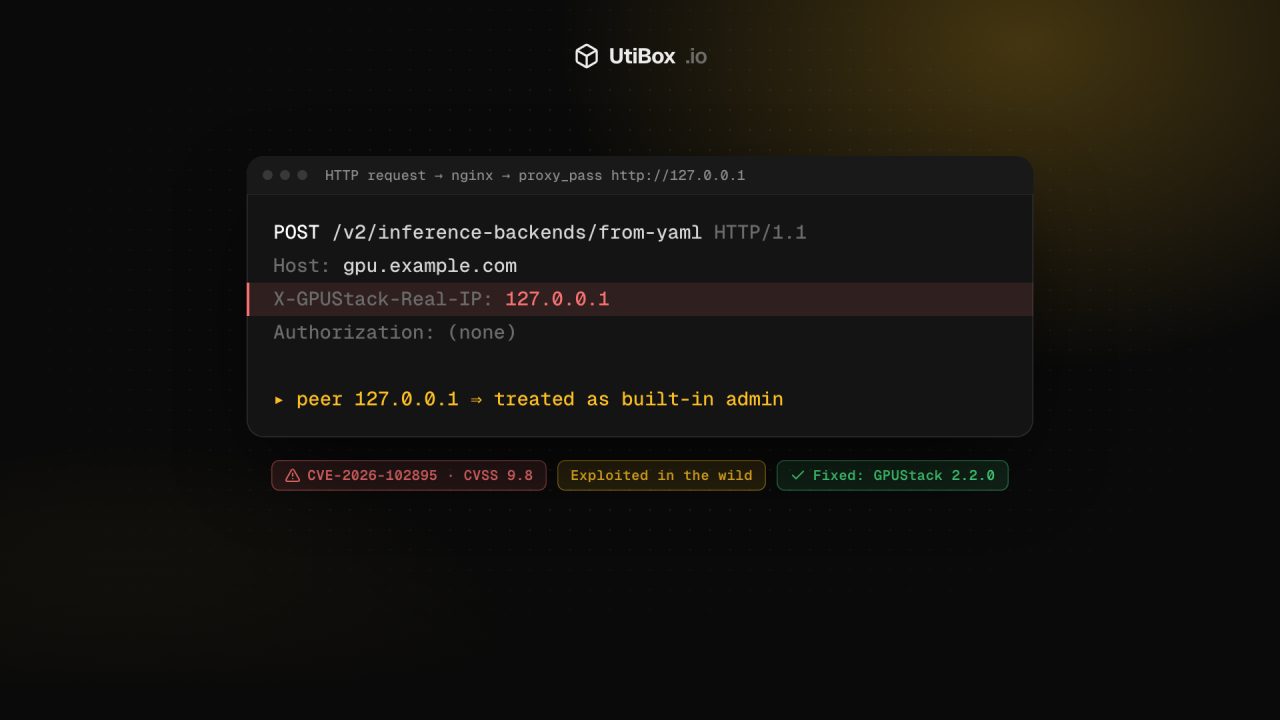
- A reverse proxy on the same server. In the common set-up, nginx or another proxy on the same host passes traffic on with
proxy_pass http://127.0.0.1:<port>. GPUStack then sees every request, including ones from the internet, arriving from127.0.0.1. No header or password is needed. - A forged header. Sending
X-GPUStack-Real-IP: 127.0.0.1could make GPUStack treat the request as local.
Either way, the visitor got full administrator access. According to the advisory, that meant changing users, models and workers, creating admin API keys that keep working from any address afterwards, and reading worker credentials and cloud-provider secrets. Through the admin-only POST /v2/inference-backends/from-yaml endpoint, it led to code execution on worker machines.
Who is affected
Any GPUStack server before 2.2.0 whose API another machine can reach, especially one behind a reverse proxy on the same host. Version 2.2.0 removes the loopback-means-admin rule and tightens how client addresses and forwarding headers are read.
Not sure whether yours answers from the internet? Put its public address into the HTTP Status Checker. The request comes from our server, not your network, so if it gets a response, anyone on the internet can reach it too. (It checks the standard web ports, 80 and 443, only.)
How to fix it
GPUStack’s upgrade guide for version 2 says to pull a newer Docker image and recreate the container, to back up the database first, and to upgrade the server before the workers:
docker pull gpustack/gpustack:v2.3.0
docker stop gpustack && docker rm gpustack
# start it again with your usual docker run options and the new image tag
If you installed the Python package instead, pip show gpustack should report 2.2.0 or later after the upgrade.
If you can’t upgrade immediately, the advisory lists three workarounds:
- Start GPUStack with
--force-auth-localhost, so local requests have to log in like everyone else. - Make sure the proxy can’t make outside traffic look local, and strip any client-supplied
X-GPUStack-Real-IPheader at the edge. - Keep the API off untrusted networks, behind a VPN or an authenticating gateway.
In nginx, setting a header to an empty string stops it being passed on, so this line in the GPUStack location block removes the forged header:
proxy_set_header X-GPUStack-Real-IP "";If an older version was exposed
Attackers with admin access could create things that outlive the upgrade. After upgrading:
- API keys: delete any you don’t recognise, especially wide-scope admin keys. Then replace the ones you do use.
- Users: remove unknown accounts and reset administrator passwords.
- Inference backends: delete custom backends nobody on your team added. That’s how the attack seen in the wild ran its reverse shells.
- Secrets: rotate cloud-provider credentials and worker tokens GPUStack stored. Our guide to rotating leaked API keys covers the order to do it in.
- Workers: check worker machines for unfamiliar processes, containers and outbound connections. If you find a shell, rebuild the machine rather than cleaning it.
The wider lesson: an address is not a password
The advisory’s own root-cause line is worth pinning above every admin panel: GPUStack was “trusting the network source of a request (socket peer, or a client-controllable header) as an authentication signal.”
Plenty of self-hosted tools have a similar shortcut, such as “no login from localhost” or an allow-list inside the app. Behind a reverse proxy on the same machine, the app sees the proxy’s address, not the visitor’s. And any X-Forwarded-For or X-Real-IP style header is just text the client can type. The safe pattern:
- Authenticate every request, including local ones.
- Accept a “real client IP” header only from a proxy you control, and overwrite it there rather than passing on what the client sent.
- Do IP allow-listing at the proxy or firewall as an extra layer, never as the only check.
Sources
- GPUStack security advisory GHSA-gj9m-f8ph-pmhr (opens in a new tab)
- CVE record: CVE-2026-102895 (opens in a new tab)
- CISA: CISA Adds Four Known Exploited Vulnerabilities to Catalog (9 November 2026) (opens in a new tab)
- GPUStack release v2.2.0 (opens in a new tab)
- GPUStack releases (v2.3.0, 23 October 2026) (opens in a new tab)
- GPUStack v2.1.1 CLI reference:
gpustack startoptions (opens in a new tab) - GPUStack v2.1.1 upgrade guide (opens in a new tab)
- nginx:
proxy_set_headerdocumentation (opens in a new tab)
Related


More from Alerts

OutageAlerts
AO3 is down again for “preventative maintenance” after its security incident
Archive of Our Own went offline again on Thursday, 19 November, four days after it came back from a security incident. Here’s what the Organization for Transformative Works has said, and what AO3…

OutageAlerts
Hetzner Object Storage outage: FSN1 and Helsinki regions report errors
Hetzner is reporting Object Storage problems in FSN1 (Falkenstein) and HEL (Helsinki), with requests to some buckets failing or timing out and writes slowed. Here’s the latest status from Hetzner…

ResolvedAlerts
Microsoft 365 outage resolved: Outlook, Teams and SharePoint are back
Microsoft has cleared the Microsoft 365 incident that cut users off from Exchange Online, Teams, SharePoint and more. It reports sustained recovery and says an earlier network capacity upgrade was…


