Redirect chains and loops: how to find them and cut them to one hop
Years of site moves leave redirect chains behind: http to https, bare domain to www, old page to new. Here’s how to trace every hop, fix loops and long chains, and choose the right status code for search engines.
Illustration: UtiBox
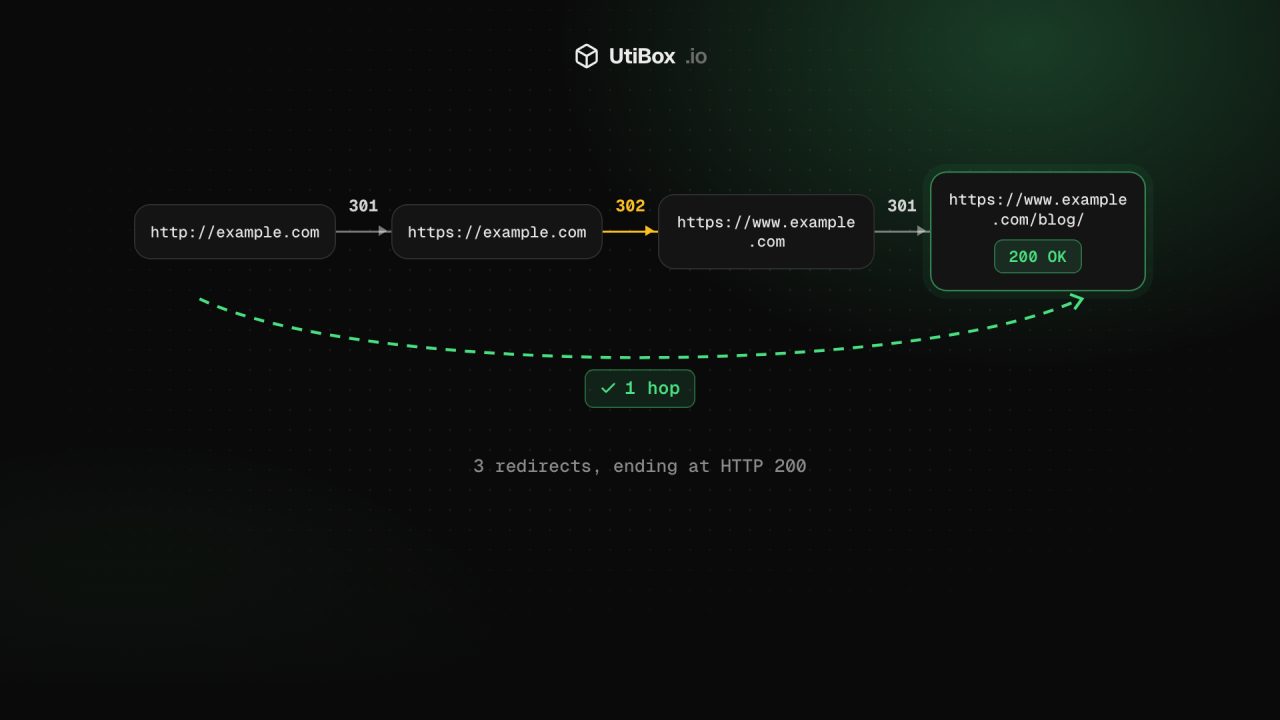
Every site move leaves a redirect behind. Switch to HTTPS, add www, rename a few pages, change CMS, and an old link can bounce through four addresses before anything appears. Each hop is another round trip for the visitor. A misconfigured one can send the browser round in circles until it gives up with “too many redirects”.
Here’s how to find those chains and loops, and cut them down to a single hop.
The status codes that matter
A redirect is a 3xx status code plus a Location header that says where to go next. These five are the ones you’ll meet:
| Code | Meaning | Use it for |
|---|---|---|
| 301 | Moved permanently | A page or site that has moved for good |
| 308 | Permanent redirect | The same, when the request method must be kept (forms, APIs) |
| 302 | Found (temporary) | A short-term move you’ll undo |
| 307 | Temporary redirect | The same, keeping the request method |
| 303 | See other | Sending a browser to a result page after a form |
The difference matters for search. Google’s documentation lists 301 and 308 as permanent redirects and uses them as a signal that the new address should become the canonical (main) version of the page. It treats 302, 303 and 307 as temporary and doesn’t use them as that signal. A permanent move served with a temporary code is an easy mistake to make, and an easy one to fix.
Step 1: trace every way in
Most sites can be reached in at least four ways: http://example.com, http://www.example.com, https://example.com and https://www.example.com. Run each one through the Redirect Checker, along with any old URLs that other sites still link to.
Press Trace. From our server, the checker follows the URL one hop at a time and lists every stop until it reaches an address that answers directly.
Step 2: read the hops
The summary line counts the redirects and gives the final status code. Each hop then shows:
- its status code, or ERR if there was no answer at all (the reason appears in its place),
- the address, and where it points next,
- the protocol and the IP address we reached,
- how long that hop took.
The final code is what your visitors end up with. A code in the 200s means the chain ends on a working page. A 404 or 410 at the end means the redirect sends people to a missing page, and a 5xx means the destination itself is failing.
Step 3: read the notes
Under the hops, the checker points out four things:
- HTTP upgraded to HTTPS. Expected and healthy.
- HTTPS downgraded to plain HTTP. Fix it: visitors drop to an unencrypted connection, even if a later hop goes back to HTTPS.
- A temporary redirect (302 or 307). If the move is permanent, switch it to 301 or 308.
- More than two redirects in a row. Point links straight at the final address and save a round trip for every extra hop.
Fixing loops
When a redirect leads back to an address already in the chain, the checker stops and says “The redirects go round in a loop”. Browsers report the same thing as ERR_TOO_MANY_REDIRECTS. Common causes:
- A CDN or proxy talks to your server over plain HTTP, the server redirects everything to HTTPS, and the CDN fetches it over HTTP again.
- Two layers disagree about
www: the CDN adds it while the server strips it, or the other way round. - The site address set in your CMS doesn’t match the address your server redirects to.
The trace shows you which two addresses are fighting. Change the rule on one side so both agree on one final address.
Fixing long chains
The checker stops after five redirects, with a note that browsers give up on long chains too. Google’s crawlers follow up to 10 hops by default, but every hop still costs your visitors time. The goal is one redirect from any old address to its final destination.
On nginx, for example, you can send every variant straight to the final address in a single hop:
server {
    listen 80;
    server_name example.com www.example.com;
    return 301 https://www.example.com$request_uri;
}

server {
    listen 443 ssl;
    server_name example.com;
    # your ssl_certificate lines here
    return 301 https://www.example.com$request_uri;
}
Then trace all four variants again. Each should take at most one hop and end on a 200.
Step 4: check the final response
The redirect trace doesn’t list response headers. Paste the final address into the HTTP Status Checker to see its status code, the safe response headers (such as Cache-Control and HSTS) and how long it took. Leave Follow redirects unticked and it shows just the first response and where its Location header points, which is handy when you’re testing a single rewrite rule.
Step 5: update the links you control
Server rules take care of old links on other people’s sites. For links you control, point them straight at the final address:
- menus, footers and links inside your posts,
- canonical tags and your XML sitemap,
- email signatures and social profiles.
The Broken Link Checker tests up to 50 links on a page and shows where redirecting links end up, so you can swap each one for its final address.
What the checker doesn’t follow
It follows redirects the server sends as a 3xx status with a Location header. A page that moves visitors on with a meta refresh tag or a script answers 200, so the trace ends there. Before following each hop, we check its address against the same safety rules as your original URL, and we never follow a redirect into a private network. Checks run from our server, in one location.
Related


More from Guides

How to set up SPF, DKIM and DMARC to improve email deliverability
A step-by-step guide to publishing SPF, DKIM and DMARC records for your domain. It covers a safe rollout from monitoring to enforcement, and how to check that each record works.

Website health check: a one-minute check-up and what to fix first
One report checks your site’s DNS, connection, certificate, HTTP response, redirects, security headers and email records. Here’s how to read each part, what the warnings mean and which problems to…

How to compare two versions of a text, config file or code, and read the diff
“What changed?” is hard to answer by eye. Here’s how a diff works, when to compare line by line or word by word, and how to read the results in the Diff Checker and Text Compare.


