What is my IP address? Public vs private, IPv4 vs IPv6, and what sites can see
Your settings say 192.168.1.23, but the support desk wants a different number. Here’s the difference between private and public addresses, how IPv4 and IPv6 differ, what a website learns from your connection and how to find out who owns an address.
Illustration: UtiBox
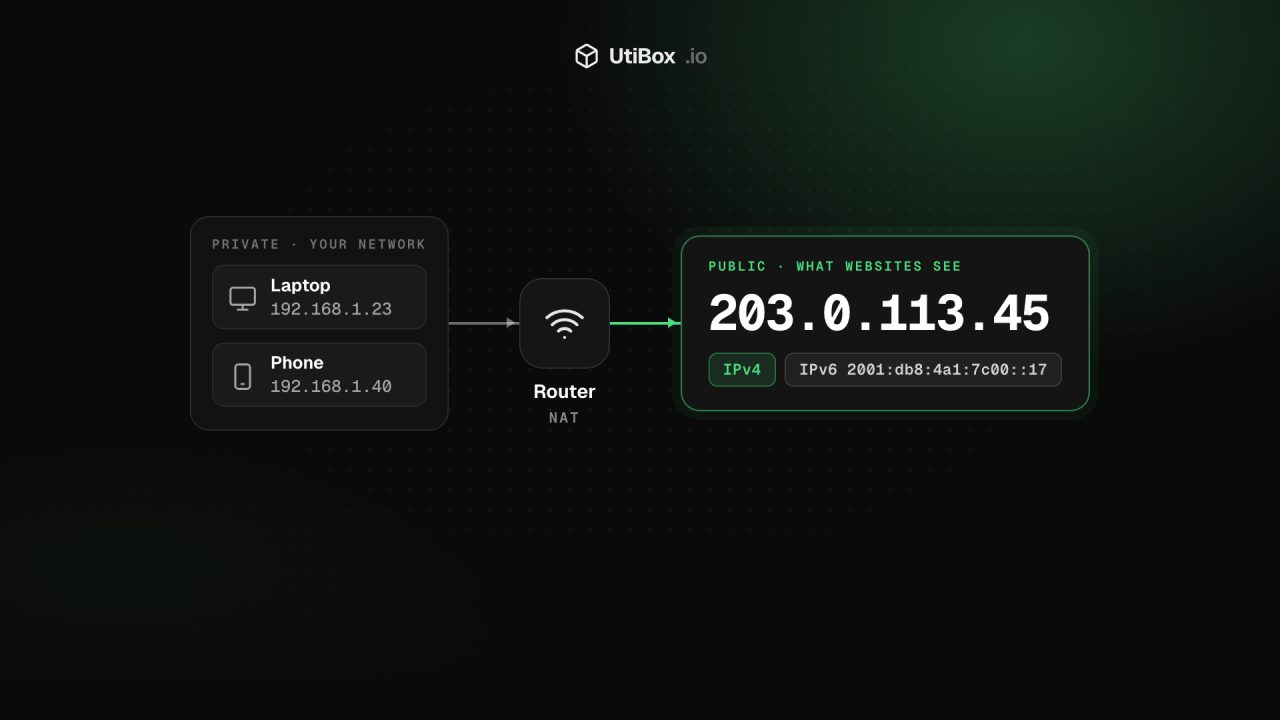
A support desk asks for your IP address. You open your network settings, read out 192.168.1.23, and they tell you that can’t be it. They’re right, and so are your settings: your device has more than one address, and only one of them is the address the internet sees.
Private addresses: the ones in your settings
Your router gives every device on your home or office network a private address. These come from ranges set aside for local networks, so the same numbers are reused in millions of homes and never travel across the internet:
| Range | Where you’ll see it |
|---|---|
192.168.0.0/16 | Most home routers (192.168.0.x, 192.168.1.x) |
10.0.0.0/8 | Offices, cloud networks, some routers |
172.16.0.0/12 | Offices and container networks |
100.64.0.0/10 | Shared space some internet providers use for carrier-grade NAT |
fc00::/7, fe80::/10 | IPv6 unique local and link-local addresses |
Public addresses: the one the internet sees
When your traffic leaves the network, the router swaps the private address for its own public address. This is network address translation (NAT), and it’s why a phone and a laptop on the same Wi-Fi normally show the same public IPv4 address. The public address is what websites, mail servers and firewalls see, so it’s the one support desks and allow-lists need.
Some providers add a second layer, carrier-grade NAT, so many customers share one public IPv4 address. If you’re behind it, the “internet” address on your router’s status page often falls between 100.64 and 100.127, and won’t match what websites see.
IPv4 and IPv6
Two versions of IP are in use side by side:
- IPv4 addresses are 32 bits, written as four numbers from 0 to 255, such as
203.0.113.45. There are only about 4.3 billion of them, which is why NAT exists. - IPv6 addresses are 128 bits, written as eight groups of hexadecimal digits separated by colons, with a run of zero groups shortened to
::, such as2001:db8:4a1:7c00::17.
IPv6 has enough addresses for every device to have its own public one, so NAT usually isn’t needed. Most systems also use temporary IPv6 addresses that change over time, so the address a site sees can change from day to day.
Many connections have both. A site that supports IPv6 will usually be reached over it, so two “what is my IP” pages can show different answers and both be right.
Find your public address
Open What Is My IP and your address appears straight away. It’s the address our server sees when your browser connects, along with:
- Version: IPv4 or IPv6.
- Hostname (reverse DNS): the name published for the address in a PTR record, if there is one. Many connections have none, which is normal.
- Device: your browser and system, read from the user-agent string, for example “Firefox on Windows”.
Copy IP puts the address on your clipboard for a support ticket or a firewall rule. Check again fetches it afresh, which is handy after switching on a VPN: if the address changes, your traffic is going through the VPN.
What a website can see about you
Every site you visit gets the same basics this page shows you:
- your public IP address, and with it any reverse DNS name and the registry record for the block it belongs to;
- your user-agent: browser, version and operating system;
- the languages your browser says you prefer, and usually the page you came from.
From the IP address alone, a site can’t read your name or street address. Many sites look it up in a geolocation database to guess a city and provider, but those guesses are often wrong, especially on mobile networks and VPNs. What Is My IP doesn’t look your address up in one, so it won’t guess your location.
A VPN, a proxy or iCloud Private Relay changes the address part: sites see the service’s address instead of yours.
Who owns an address?
When an unfamiliar address turns up in your server logs or a sign-in alert, paste it into the IP Address Lookup. It asks the right regional internet registry (ARIN, RIPE, APNIC, LACNIC or AFRINIC) over RDAP and shows:
- the network name, the range and the CIDR prefix the address belongs to;
- the organisations named for the block, each with its role, and the abuse contact for reporting spam or attacks;
- the origin AS when the registry record includes it, the reverse DNS name, and when the record was registered and last changed.
A country appears only when the registry states one, and it’s where the block is registered, not where it’s used. A small business’s address is often registered to its internet provider. The lookup also accepts AS numbers such as AS13335, and refuses private and reserved addresses, which no single organisation holds.
Before you allow-list your own address
Home and mobile addresses often change when the router restarts or the provider reassigns them. If you allow-list yours in a firewall rule, for SSH say, expect to update it, and don’t make it your only defence. Our SSH hardening checklist covers what else to put in place.
Related


More from Guides

Heading structure: one H1, no skipped levels, and why it matters
Headings are how readers skim a page and how assistive technology moves around it. Here’s what the HTML standard and WCAG ask for, what Google actually says about headings, and how to check any…

How to write titles and meta descriptions that fit Google’s search results
Google cuts titles and snippets to fit the screen, and sometimes writes its own. Here’s what Google’s documentation actually says, and how to draft, count and check yours before and after a page…

UUIDs explained: v4 vs v7, and when to use them as database IDs
A UUID is a 128-bit ID anyone can create without asking a central server. Here’s how to read one, the difference between random version 4 and time-ordered version 7, and when a UUID is the right…


