UUIDs explained: v4 vs v7, and when to use them as database IDs
A UUID is a 128-bit ID anyone can create without asking a central server. Here’s how to read one, the difference between random version 4 and time-ordered version 7, and when a UUID is the right primary key, and when it isn’t.
Illustration: UtiBox
Your app creates orders on phones with no signal, in two separate services and in a nightly import, and every order needs an ID before anything reaches the database. Or your invoice links end in /invoice/1042, and a customer has worked out that /invoice/1043 belongs to someone else. Both are good reasons to look at UUIDs.
What a UUID is
A UUID (universally unique identifier) is a 128-bit value, written as 32 hexadecimal digits in five groups of 8, 4, 4, 4 and 12:
3f2b8c1e-5d47-4a9b-b2e6-0c71f4d8a953Two positions tell you what kind it is. The first digit of the third group is the version (4 here). The first digit of the fourth group is the variant, and for standard UUIDs it’s always 8, 9, a or b.
The format is defined in RFC 9562, which replaced RFC 4122. The versions you’re most likely to meet:
| Version | How it’s made |
|---|---|
| 1 | A timestamp plus a node ID, often the network card’s MAC address |
| 3 and 5 | A hash of a name (MD5 or SHA-1), so the same name always gives the same UUID |
| 4 | Random |
| 6 | Version 1 rearranged so it sorts by time |
| 7 | Unix time in milliseconds, then random bits |
| 8 | A custom layout of your own |
For new projects the choice is nearly always between version 4 and version 7, and those are the two the UUID Generator makes.
Version 4: random
A v4 UUID is 122 random bits plus the 6 fixed bits that mark its version and variant. With that much randomness, you’d need to create about 2.7 billion billion (2.7 × 10¹⁸) of them before there was even a 50% chance of a single duplicate. As long as the random numbers come from a good source, collisions aren’t a practical concern.
A v4 ID gives nothing away: not when it was made, not where, and not how many came before it.
Version 7: time-ordered
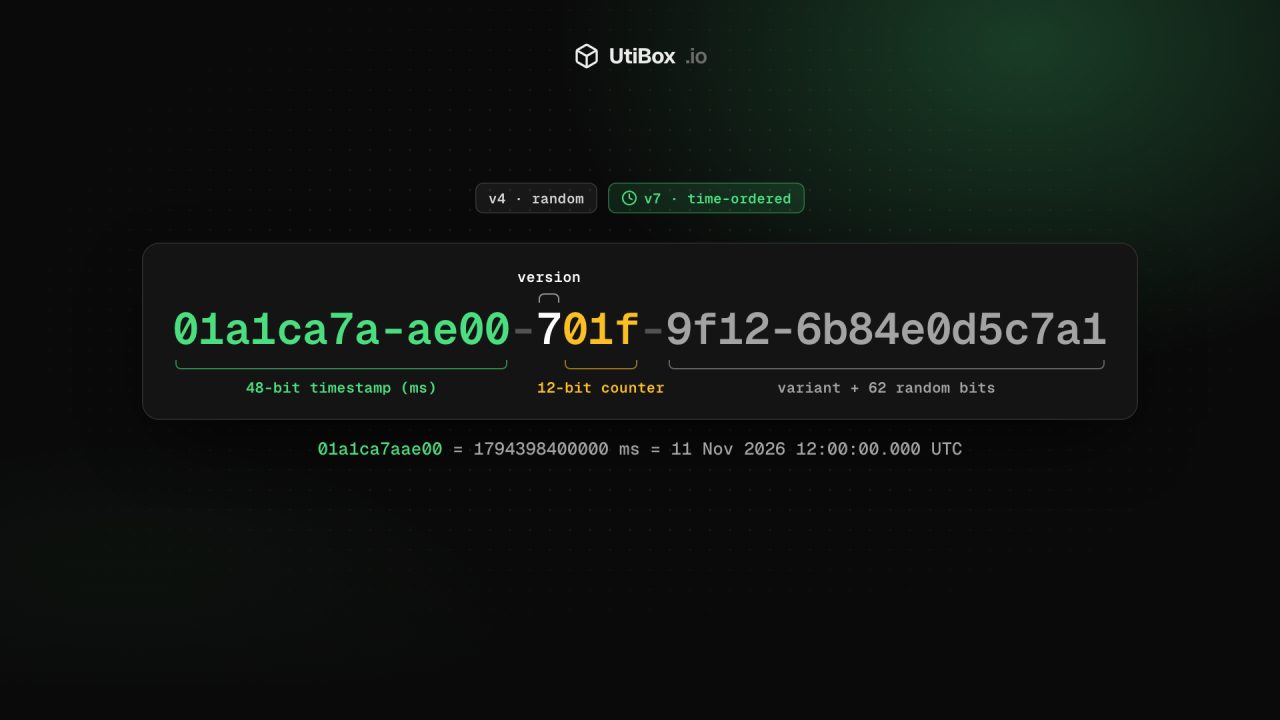
A v7 UUID starts with its creation time, so IDs made later sort after earlier ones:
01a1ca7a-ae00-701f-9f12-6b84e0d5c7a101a1ca7aae00, the first 12 digits, is1794398400000: milliseconds since 1970, or 12:00:00.000 UTC on 11 November 2026.7is the version.- The next 12 bits (
01f) are, in our generator, a counter that keeps IDs made in the same millisecond in order. - The rest holds the variant and 62 random bits.
That order matters to databases. Primary keys usually live in a B-tree index. Random v4 keys land all over it, so inserts keep touching different parts of the index; time-ordered v7 keys are added near the end, which keeps the index compact and inserts fast. That’s the main reason v7 has become popular for primary keys.
The catch: anyone holding a v7 ID can read when it was created, to the millisecond. Where that matters, in a public link for example, use v4.
When to use a UUID as an ID
UUIDs are a good fit when:
- IDs are created in many places: several services, offline apps, imports, or databases you’ll merge later;
- you need an ID before the record is saved, for example to link related records in one go;
- IDs appear in URLs or APIs and you don’t want them guessable in sequence;
- you need request IDs or idempotency keys that won’t clash across systems.
An auto-increment integer is still the better choice when one database creates every ID, the IDs never leave your system and space matters. A UUID takes 16 bytes, against 4 or 8 for an integer, in every index and every foreign key that refers to it.
A few rules either way:
- Store the bytes, not the text. Use your database’s native UUID type or a 16-byte binary column rather than a 36-character string.
- Don’t treat a UUID as a secret. RFC 9562 says implementations shouldn’t assume UUIDs are hard to guess, and that they must not be used as identifiers whose mere possession grants access. A private link still needs a check that the visitor is allowed to see it.
- Prefer v7 for primary keys, and v4 when the creation time shouldn’t show.
Using the UUID Generator
- Choose Version 4 (random) or Version 7 (time-ordered). The page remembers your choice for next time.
- Set How many (1 to 1,000) and press Generate, or press Enter in the box.
- Reshape the list with Uppercase, No hyphens or Wrap in { }, the style some Windows and .NET tools expect. These change the format of the same IDs rather than making new ones.
- Copy the list, or Download it as a text file with one UUID per line.
The randomness comes from your browser’s cryptographically secure generator (crypto.getRandomValues), and nothing is fetched from or sent to a server. Generate a v7 batch and you’ll see the IDs share their first characters and come out already sorted. That’s the timestamp at work, not a fault.
Related


More from Guides

HTTP status codes explained for site owners: 2xx, 3xx, 4xx and 5xx
Every response starts with a three-digit code that browsers mostly hide but search engines and uptime monitors read first. Here’s what each family means, how Google’s crawlers treat them, and what…

XML sitemaps search engines can read: limits and common errors
One unescaped character can stop a crawler reading the rest of your sitemap. Here’s what belongs in an XML sitemap, the limits set by sitemaps.org and Google, the errors that break it, and how to…

Heading structure: one H1, no skipped levels, and why it matters
Headings are how readers skim a page and how assistive technology moves around it. Here’s what the HTML standard and WCAG ask for, what Google actually says about headings, and how to check any…


