Heading structure: one H1, no skipped levels, and why it matters
Headings are how readers skim a page and how assistive technology moves around it. Here’s what the HTML standard and WCAG ask for, what Google actually says about headings, and how to check any page’s outline.
Illustration: UtiBox
Themes and page builders often pick heading levels for how they look. The logo becomes the H1, the sidebar uses H4 because it’s small, and an article jumps from H2 to H5 because someone liked that size. On screen it looks fine. Underneath, the structure is a mess, and the people who rely on it can’t see the design.
Here’s what the standards ask for, what Google actually says, and how to check and fix a page.
Why headings matter
The W3C’s accessibility tutorial puts it plainly: “Headings communicate the organization of the content on the page. Web browsers, plug-ins, and assistive technologies can use them to provide in-page navigation.” In practice, that lets someone using a screen reader jump from heading to heading, much like a sighted reader skimming the bold titles.
That only works with real heading elements, <h1> to <h6>, at sensible levels. WCAG 2.2 success criterion 1.3.1 Info and Relationships (opens in a new tab) (Level A) requires that structure shown visually can also be determined by software. Big bold text styled to look like a heading isn’t a heading to a screen reader.
What the standards ask for
The HTML standard (opens in a new tab) sets two rules for the outline, the list of all headings in document order:
- “If a document has one or more headings, at least a single heading within the outline should have a heading level of 1.”
- “Each heading following another heading lead in the outline must have a heading level that is less than, equal to, or 1 greater than lead’s heading level.”
In plain English: go down one level at a time, and back up as far as you like. H2 to H4 skips a level; H4 back to H2, starting a new section, is fine.
The W3C tutorial on headings (opens in a new tab) agrees: “Skipping heading ranks can be confusing and should be avoided where possible.” It adds one exception: in fixed parts of the page such as sidebars, keep the same levels on every page rather than adjusting them to the content.
One H1 or several?
HTML asks for at least one level-1 heading and doesn’t forbid a second. One H1 that names the page, matching the page title, is still the clearest choice. Make it the content’s title, not the site name: in the W3C’s example of a page whose navigation comes first, “the main heading is not the site name but the content heading, which is rank 1.”
What Google says
A lot of SEO advice overstates headings. Google’s SEO Starter Guide (opens in a new tab) lists “Number and order of headings” under things not to focus on:
Having your headings in semantic order is fantastic for screen readers, but from Google Search perspective, it doesn’t matter if you’re using them out of order.
It adds that there’s “no magical, ideal amount of headings a given page should have.”
Headings still count in one way. Elements such as <h1> are among the sources Google uses for the title link (opens in a new tab) in results, and it suggests “putting the title text in the first visible <h1> element on the page”. So a clear H1 helps Google pick the right title. A tidy order is for your readers, which is reason enough.
Check a page with the Heading Structure Checker
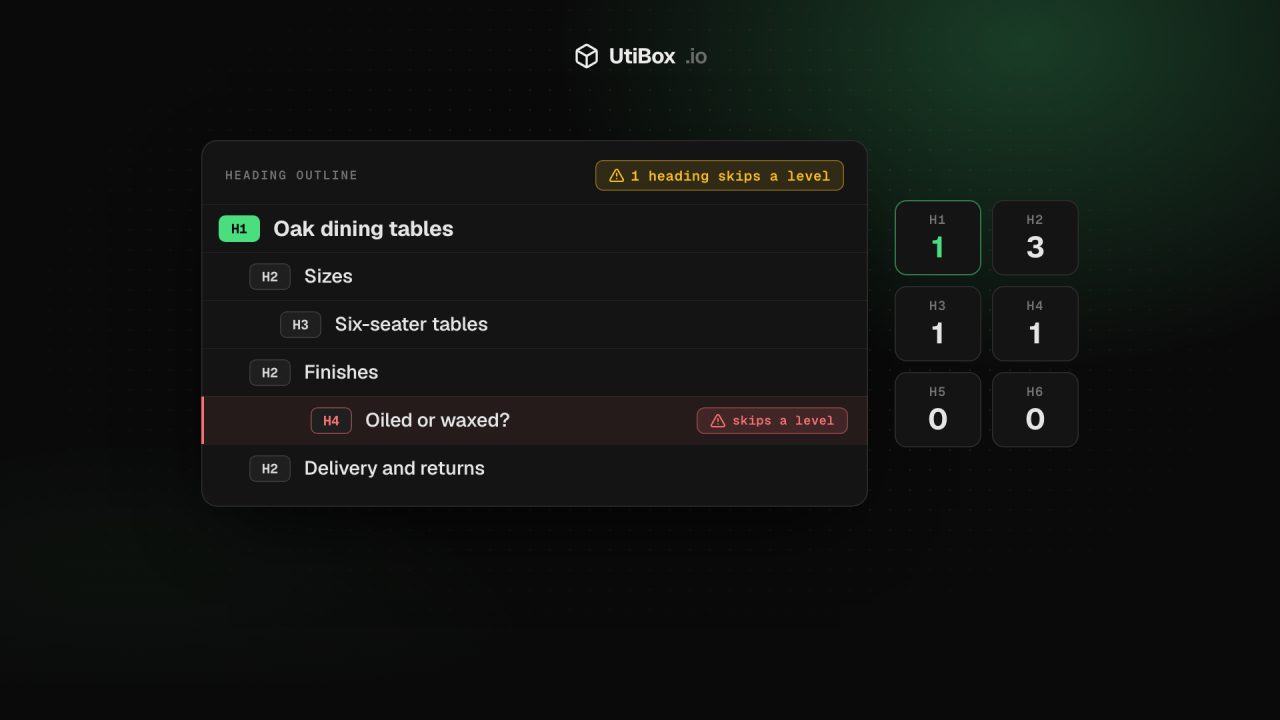
Paste a URL into the Heading Structure Checker and press Check headings. We fetch the page from our server, pull out every H1 to H6 in the order they appear, and draw them as an indented outline.
- Findings: a summary line, then the details. A page with no H1 is a failure. More than one H1, headings that skip a level and empty headings are warnings. A note appears if a heading comes before the H1, often a logo or banner marked up as a heading.
- Counters for each level, H1 to H6.
- The outline, indented by level, flagging headings that skip a level or have no text. Only downward steps count as skips, so H4 back to H2 isn’t flagged, matching the HTML rule.
A heading that holds only an image takes its alt text, so a logo with good alt text isn’t reported as empty. The checker reads the HTML your server sends, up to 1 MB, without running JavaScript, so headings added by scripts won’t appear. The outline shows the first 300 headings; the counters include them all.
Fixing what it finds
| Finding | Usual cause | Fix |
|---|---|---|
| No H1 | The theme shows the page title in a styled <div> or <p> | Mark the main title up as <h1> |
| Two or more H1s | The site name or logo is an H1 as well as the article title | Keep <h1> for the page title; make the logo a plain link |
| Skipped level | A level chosen for its size | Pick the next level down and resize it in CSS |
| Empty heading | An icon-only heading, or a leftover block in the editor | Remove it, or add text or alt text |
| A heading before the H1 | A banner or newsletter box marked up as <h2> above the title | Turn it into plain text, or move it below the H1 |
The rule behind most of these fixes: choose the level for structure, and set the size with CSS.
<h2>Delivery and returns</h2>
<h3>Returns within 30 days</h3>

/* smaller sidebar headings, same level everywhere */
.sidebar h2 { font-size: 1rem; }
After changing a template, check a few page types, such as the home page, a post and a category page, because each often has its own layout. The Meta Tag Checker also reports the H1 count next to the title.
Related


More from Guides

How to compare two versions of a text, config file or code, and read the diff
“What changed?” is hard to answer by eye. Here’s how a diff works, when to compare line by line or word by word, and how to read the results in the Diff Checker and Text Compare.

UUIDs explained: v4 vs v7, and when to use them as database IDs
A UUID is a 128-bit ID anyone can create without asking a central server. Here’s how to read one, the difference between random version 4 and time-ordered version 7, and when a UUID is the right…

Base64 vs URL encoding: what each is for, and the mistakes that break things
Base64 and URL encoding both turn data into “safe” characters, but they solve different problems, and neither hides anything. Here’s when to use each, why Base64 isn’t encryption, and the mistakes…


