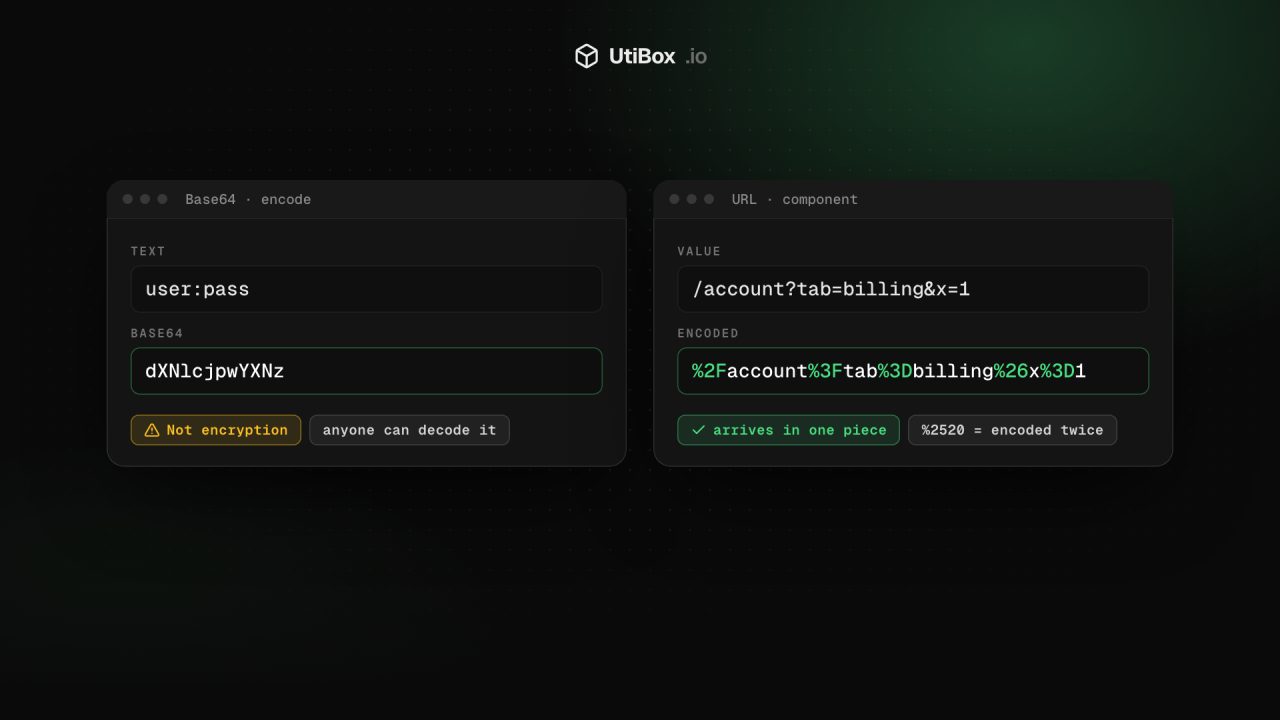
Base64 vs URL encoding: what each is for, and the mistakes that break things
Base64 and URL encoding both turn data into “safe” characters, but they solve different problems, and neither hides anything. Here’s when to use each, why Base64 isn’t encryption, and the mistakes behind broken links, lost plus signs and exposed passwords.
Illustration: UtiBox
A redirect link stops working as soon as the address inside it contains an &. A phone number reaches your API with a space where the + was. Someone in a code review says a password is safe because it’s “encrypted” as cGFzc3dvcmQ=. All three come from mixing up two encodings that look alike but do different jobs.
Encoding isn’t encryption
Base64 and URL encoding can both be reversed by anyone: there’s no key and nothing secret. They exist to carry data safely through places that only accept certain characters, not to hide it. (That “encrypted” password above decodes to password.)
| What it does | Can anyone reverse it? | |
|---|---|---|
| Base64 | Turns any bytes into 64 plain characters | Yes |
| URL (percent) encoding | Escapes characters that would break a URL | Yes |
| Encryption | Scrambles data so only a key holder can read it | No, not without the key |
| Hashing | Makes a one-way fingerprint of data | No |
Base64: bytes as text
Base64 turns any bytes, including images and other binary files, into letters, digits, + and /, with = as padding at the end. Every 3 bytes become 4 characters, so the result is about 33% larger than the original.
You’ll meet it in:
- data: URLs, which embed a small image straight into HTML or CSS;
- email attachments, which travel inside the message as Base64;
- the HTTP Basic authentication header, where
user:passis sent asBasic dXNlcjpwYXNz; - JSON Web Tokens, whose header and payload are Base64URL-encoded JSON.
That header is the clearest proof that Base64 hides nothing: anyone who sees it can read the password. It’s only safe over HTTPS.
Base64URL is a variant for places where +, / and = cause trouble, such as URLs, file names and tokens. It uses - and _ instead and usually drops the padding.
URL encoding: characters a URL can’t carry
URLs may only contain a limited set of characters, and some of those have jobs: ? starts the query, & separates parameters, = joins a key to its value and # starts the fragment. Anything else, or any of those used as plain data, is written as % plus two hexadecimal digits for each byte of its UTF-8 form. A space becomes %20 and é becomes %C3%A9.
There are three flavours, and picking the wrong one causes most bugs:
- Component encoding (JavaScript’s
encodeURIComponent) escapes everything except letters, digits and a few marks such as-,_,.and~. Use it for a single value, such as a search term or an address inside another URL. - Full URL encoding (
encodeURI) leaves:,/,?,&and=alone and escapes only things like spaces and accented letters. Use it to tidy a complete address. - Form data is what an HTML form sends: component encoding, with
+for a space.
The mistakes that break things
- Full-URL encoding a value. Put
/account?tab=billing&x=1into anext=parameter withencodeURIand its&splits off a second parameter. Component encoding gives%2Faccount%3Ftab%3Dbilling%26x%3D1, which arrives in one piece. - Encoding twice. Encode
%20again and you get%2520. If you see%25in a link, something encoded a value that was already encoded. - Losing plus signs. In form data and query strings,
+stands for a space, so a phone number like+1 555 0100can arrive with a space where the plus was. Encode a real plus with component encoding, which writes it as%2B. - Putting standard Base64 in a URL. Its
+,/and=all mean something there. Use Base64URL, or percent-encode the Base64 string. - Storing secrets as Base64. A Base64 value in a config file or a cookie is as readable as plain text. If it needs protecting, encrypt it.
- Embedding big files as data: URLs. The 33% growth, and losing separate caching, make a large photo slower than a normal image file. Keep data: URLs for small icons.
Using the UtiBox tools
Both tools run entirely in your browser, so what you paste isn’t sent to UtiBox.
- Choose Encode or Decode; the result appears as you type. Text is converted to UTF-8 first, so accents and emoji round-trip correctly.
- Tick URL-safe for Base64URL output (
-and_, no padding). - Decoding is forgiving: spaces and line breaks are ignored, missing
=padding is added back, and-and_are read as+and/. If the input contains characters Base64 never uses, or has an impossible length, the tool says which. - If the decoded bytes aren’t UTF-8 text, it tells you and offers Download decoded bytes.
- Drop a file of up to 25 MB on File to Base64 to get its Base64, with a
data:prefix unless you untick it, plus the original and encoded sizes.
- Choose Encode or Decode, then Component, Full URL or Form data.
- If the text contains a query string, a Query parameters table lists each key with its decoded value, so a duplicated key or an empty value stands out.
- Decoding in Full URL mode leaves codes such as
%2Fand%26in place on purpose, since decoding them would change how the address is read. Component decodes everything. - A
%that isn’t followed by two hex digits, or bytes that aren’t valid UTF-8, gives a clear error rather than a wrong answer.
In both tools, Swap moves the result back into the input and flips the direction, a quick way to check that a value round-trips.
Related


More from Guides

HTTP status codes explained for site owners: 2xx, 3xx, 4xx and 5xx
Every response starts with a three-digit code that browsers mostly hide but search engines and uptime monitors read first. Here’s what each family means, how Google’s crawlers treat them, and what…

XML sitemaps search engines can read: limits and common errors
One unescaped character can stop a crawler reading the rest of your sitemap. Here’s what belongs in an XML sitemap, the limits set by sitemaps.org and Google, the errors that break it, and how to…

Heading structure: one H1, no skipped levels, and why it matters
Headings are how readers skim a page and how assistive technology moves around it. Here’s what the HTML standard and WCAG ask for, what Google actually says about headings, and how to check any…


