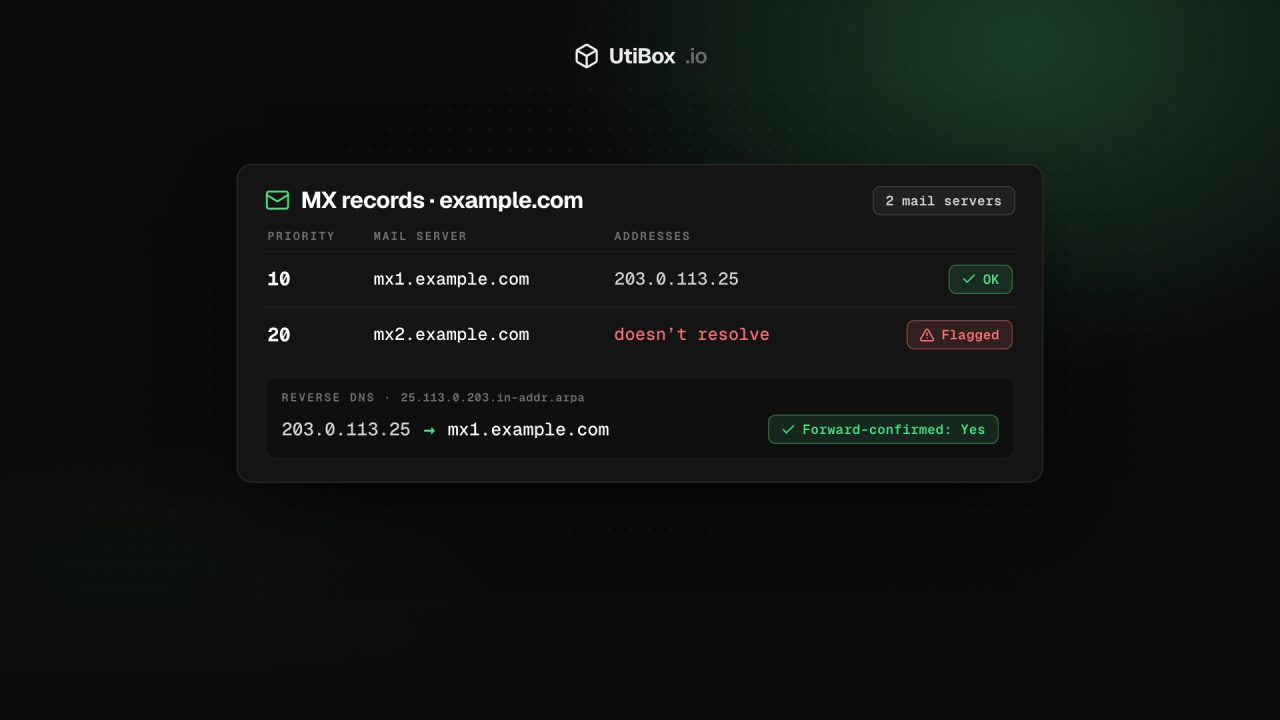
Email not arriving? Check where a domain’s mail goes with MX records
When messages bounce or vanish, start with two DNS checks: the MX records that say where a domain’s mail is delivered, and the reverse DNS of the server that sends it. Here’s how both work, the usual mistakes and how to check them in a minute.
Illustration: UtiBox
A customer says their emails to you bounce. Weeks after a move to a new email provider, some messages still reach the old mailbox. Or the mail your server sends lands in spam. Three problems, two DNS questions: where is this domain’s mail delivered, and does the sending server look trustworthy?
Incoming and outgoing mail use different records
| Direction | Record | What it answers |
|---|---|---|
| Mail coming to your domain | MX | Which servers accept mail for the domain |
| Mail sent as your domain | SPF, DKIM, DMARC | Which servers may send as the domain, and how to prove it |
| Mail sent from your server | PTR (reverse DNS) | Which name belongs to the sending IP address |
If mail to you goes missing, start with MX. If mail from you is rejected or marked as spam, check SPF, DKIM and DMARC (our guide to SPF, DKIM and DMARC explains all three) and your sending server’s reverse DNS.
How MX records work
When someone writes to sales@example.com, their mail server asks DNS for the MX records of example.com. Each record has a priority and a host name:
example.com.   3600   IN   MX   10 mx1.example.com.
example.com.   3600   IN   MX   20 mx2.example.com.
The sender tries the lowest number first and falls back to higher numbers if that server doesn’t answer. Records with the same number share the load. Each host name must then resolve to an address through its own A or AAAA record; an MX record can’t hold an IP address itself.
Two special cases matter:
- A null MX (priority 0, host
.) says the domain accepts no email at all. It’s the right setting for domains that never receive mail. - With no MX records, senders fall back to the domain’s own address, an “implicit MX”. That server usually isn’t set up for mail, so messages are likely to bounce.
Check a domain in a minute
Type the domain, or a whole email address, into the MX Record Lookup. You get:
- a summary: how many mail servers were found, or why there are none (a null MX, a domain that doesn’t exist, or no MX records at all);
- each mail server in priority order, with the addresses its name resolves to and its TTL in seconds;
- a flag on any server whose name doesn’t resolve, or resolves to a private address, because other servers can’t deliver to it;
- with no MX records, the domain’s own addresses, which senders will try instead;
- a note when the names look like a well-known service such as Google Workspace or Microsoft 365, judged from the names alone.
A link then opens the SPF & DMARC Checker for the same domain.
The usual MX mistakes
- The old provider is still listed. The new provider’s records were added but the old ones never removed, so some senders still deliver to the old servers.
- A forgotten backup MX. A higher-numbered server that no longer accepts your mail catches messages whenever the main one is slow.
- A server name that doesn’t resolve. A typo, or a host that was deleted. The lookup flags these.
- A change that hasn’t spread yet. Resolvers, ours included, keep old answers until the TTL runs out. The DNS Propagation Checker shows what large public resolvers see.
- A domain that doesn’t exist. Check the spelling, then the registration with WHOIS Lookup.
Why reverse DNS matters for mail servers
Normal DNS turns a name into an address. Reverse DNS goes the other way: a PTR record says which host name belongs to an IP address. A receiving server sees only the IP address of the server delivering to it, and many look up its PTR record before accepting the message. A missing or mismatched PTR is a common reason for mail being rejected or marked as spam.
Whoever controls an address block can publish any PTR name they like, so receivers also check that the name resolves back to the same address. That’s called forward-confirmed reverse DNS.
Check your sending server’s PTR
First find the public IP address your mail server sends from: the Received: lines in the full headers of a message it delivered will show it. Then enter that address in the Reverse DNS Lookup. It shows:
- each PTR name published for the address;
- the addresses each name resolves to;
- Forward-confirmed: Yes when the name leads back to the same IP, No when it doesn’t;
- the special name used for the query: for
203.0.113.25that’s25.113.0.203.in-addr.arpa.
If no name is listed, the address has no PTR record. You can’t add one in your domain’s DNS: PTR records are set by whoever controls the address block. Hosting companies and cloud platforms usually offer it in their control panel; on a business line, ask your internet provider. Set the PTR to your mail server’s name, such as mail.example.com, and make sure that name has an A or AAAA record pointing back to the same address.
A quick checklist
- The MX records list only your current provider’s servers
- Every MX host resolves to a public address
- Domains that never receive mail publish a null MX
- The sending server’s IP address has a PTR record
- That PTR name resolves back to the same address (forward-confirmed)
- SPF, DKIM and DMARC are in place for the sending domain
Related


More from Guides

HTTP status codes explained for site owners: 2xx, 3xx, 4xx and 5xx
Every response starts with a three-digit code that browsers mostly hide but search engines and uptime monitors read first. Here’s what each family means, how Google’s crawlers treat them, and what…

XML sitemaps search engines can read: limits and common errors
One unescaped character can stop a crawler reading the rest of your sitemap. Here’s what belongs in an XML sitemap, the limits set by sitemaps.org and Google, the errors that break it, and how to…

Heading structure: one H1, no skipped levels, and why it matters
Headings are how readers skim a page and how assistive technology moves around it. Here’s what the HTML standard and WCAG ask for, what Google actually says about headings, and how to check any…


